
CutWire Drift
by Suhas Dissanayake
 Founding Developer
- Productivity
- Free
CutWire Drift is a free video editor for Android, Windows, macOS and Linux, made in Sri Lanka by Suhas Dissanayake. Available in Sinhala.

This app is free to use. If the developer ever charges for anything, you pay them directly; AppKade doesn’t process payments.
Overview
Drift is a free, open-source, beginner-friendly desktop video editor built with Qt 6 and FFmpeg
The free editor that makes your videos look finished — not “good enough.”
Drift is a desktop video editor from CutWire Studios. Drop in clips, add effects, captions, stickers, and music, then export a polished video — with no subscription, no watermark, and no account.
It is built for the edits people actually make: Reels and Shorts, game clips, school projects, tutorials, product demos, memes, and anything you want to look sharp without living in a browser or paying a monthly fee.
What you see in the preview is what you export. One compositor, one look, no surprises.
Download
Linux — install from Flathub:
macOS — install via Homebrew:
First launch on macOS: Drift is signed ad-hoc (not notarized by Apple). The quarantine attribute is automatically removed when installing via Homebrew. If you install manually via .dmg or if Gatekeeper still blocks opening it, run:
Or grab a build for your platform from the latest release:
On a phone, join closed testing on Google Play, or grab Drift-*-arm64-v8a.apk from the latest release and install it (or adb install Drift-*-arm64-v8a.apk). Use x86_64 for emulators.
See all releases for previous versions and full changelogs.
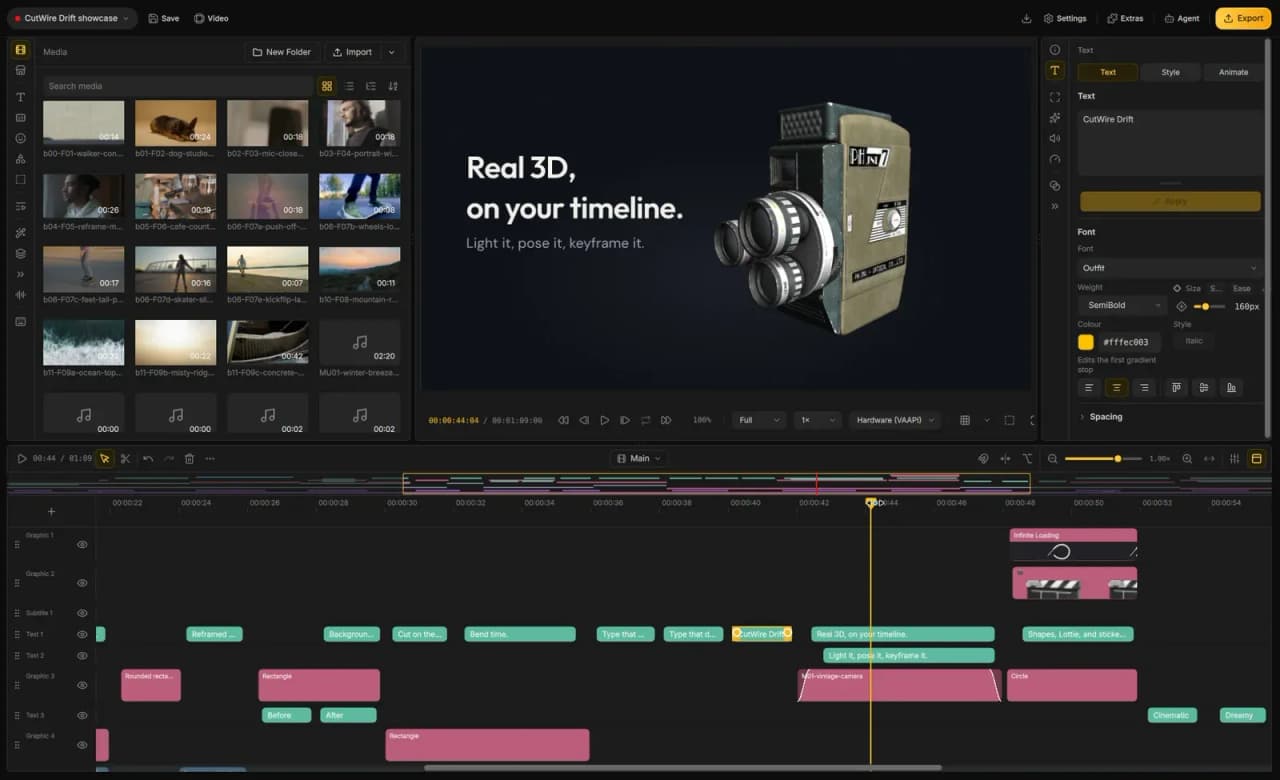
Screenshot
Features
An agent can edit the open project. Import, cut, grade, and export in the project you have open. The same editor can run with no window.
3D on the timeline. Tilt clips in space, light them, and park a title behind the subject. Drop in a 3D model and it plays in the same cut.
Lottie animations. Motion graphics and vector art stay sharp at any size. Recolour or reword them in place.
Advanced keyframing. Animate position, scale, rotation, opacity, and effect parameters over time. Draw the curve yourself.
150+ transitions and 40+ effects. Every look previews on your footage. One click can drop a whole stack — Beat Drop, Glitch Cut, Neon Cutout. Trails of earlier frames, and grades that stick to one clip.
On this machine. Click a subject and lift it off the shot. Add depth of field and lights that belong to the clip. Automatic captions, video upscale, and live face retouch — all on your computer.
Edit the words. Speech becomes text on the clip. Cut phrases, drop fillers, strip silence, pick the best takes, label speakers, and build captions from those times.
Titles with a real look. Thirty-three packs — karaoke, Hormozi-style, neon, chrome, holographic, handwritten. Copy one style onto every subtitle on the track.
Move a whole stack at once. One layer can drag, scale, rotate, tilt, and fade everything under it. Nest layers, or open a composite when the stack needs its own timeline.
Cut to the music. The timeline snaps to the beat. Clips split and land on the bar. Music ducks under speech and comes back to its own level. Reframe a landscape take into a vertical video that follows the face.
A timeline that behaves. Multi-track filmstrips, ripple, snap, masks, freeze frame, bookmarks, a mixer. Split a clip and the grade stays. A crash leaves the last save intact.
Audio that sounds finished. Clean up speech, meter loudness, EQ and compress, keep pitch when you change speed, record a voiceover.
Find shots. Switch cameras. Search footage for what’s on screen. Watch every angle at once and punch the cut.
Stabilise, export, take the project with you. Smooth shaky clips, upscale, play heavy files smoothly. MP4, GIF, audio-only, or just a range. Pack the media with the edit so paths stay whole.
Android is the same editor. Timeline, effects, and export on the phone. Share straight from the app.
Stock, voices, and a small install. Search stock into the bin. Generate voiceover and sound effects. Fonts, stickers, and extra models download when you use them. UI in Arabic, Bengali, Spanish (Spain and Colombia), French (Canada), Italian, Japanese, Portuguese (Brazil and…
Details
- Category
- Productivity
- Pricing
- Free
- Where it runs
- Android, Windows, macOS, Linux
- Made for
- Individuals, Small businesses, Larger businesses, Schools and tutors, Developers
- Languages
- English, Sinhala
- Developer
- Suhas DissanayakeAppKade has confirmed their email address. Their website and phone haven’t been checked yet. What the levels mean
- Listed on
- 28 October 2026
Reviewed by AppKade, last on 28 October 2026. A review is not an endorsement or a security audit. The app is sold and supported by its developer; AppKade doesn’t process purchases. Something wrong? . How reviews work
Reviews and questions
No reviews or questions yet. Ask Suhas Dissanayake anything and the answer appears here. Reviews come only from buyers who contacted Suhas Dissanayake about CutWire Drift, and each one is checked before it’s published. How reviews work
Contact the developer
Ask about CutWire Drift
Your message goes to the developer, who handles the sale and support. Before you pay, read how to stay safe.
Similar apps
Other apps for the same job as CutWire Drift.





Can’t find the app you need?
Build it and list it on AppKade. We help independent developers get their apps in front of the people who need them.
List your app